

What Is AJAX and How Does It Work in Web Development?

The Short Answer
AJAX is not a standalone programming language, a ready-made framework, or a new technology by itself. It is a web development approach that lets a page or application send asynchronous requests to a server or API, then update part of the page without reloading the whole page.
The historical name is Asynchronous JavaScript and XML, but XML is no longer required. In modern applications, data is often exchanged as JSON or another format that fits the system.
Information last reviewed:September 2, 2026
Guide Sections
What is AJAX?
AJAX can be understood as a working method that combines JavaScript in the browser, HTTP requests, and a browser API such as XMLHttpRequest or Fetch API, then updates the page interface through the DOM after the response arrives.
Not a programming language
AJAX does not replace JavaScript, PHP, or any server language. It is a usage pattern that connects the page interface and the server asynchronously.
Not a framework
It can be used in simple websites or large applications, and with different frameworks, because it depends on the request-and-response idea rather than one library.
Not only XML
The name kept XML historically, but JSON is the common choice in many modern web applications because it is simple to use with JavaScript.
How does AJAX work inside a web page?
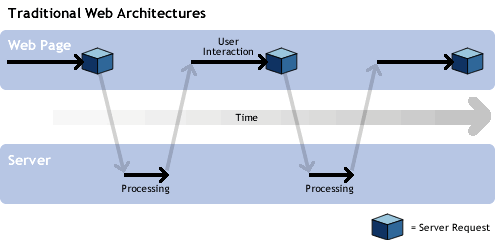
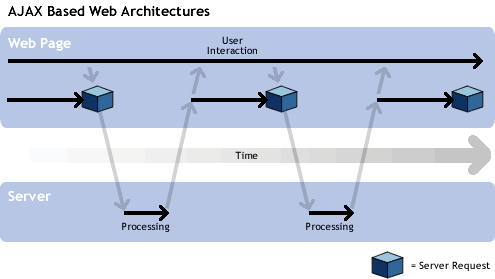
In a traditional page, the user sends a request to the server and the server returns a full HTML page, so the whole page reloads. In the AJAX model, the browser can send a background request to fetch data or save a change, then display the result inside a specific part of the page.
- The user interacts with an element on the page, such as search, filtering, submitting a form, or loading more content.
- JavaScript uses an interface such as XMLHttpRequest or Fetch API to send an HTTP request to the server or API.
- The server processes the request and returns suitable data, such as JSON, partial HTML, text, or another format.
- JavaScript reads the response and updates the required part of the page without a full new load.
Educational comparison between the traditional model and the AJAX model
The following diagrams are from the original page material and are useful as a simplified explanation of reducing full page reloads. They do not show every detail of modern applications, such as state management, security, caching, or API layers.
The relationship between AJAX, XMLHttpRequest, and Fetch API
Historically, AJAX was associated with the XMLHttpRequest object, because it allowed browser scripts to send requests to the server without loading a new page. In the modern web, the same asynchronous request idea can also be implemented with Fetch API.
| Term | Role | Important note |
|---|---|---|
| AJAX | A development style or pattern for updating parts of a page using asynchronous requests. | It is not one API and not a framework. |
| XMLHttpRequest | An older browser interface, still in use, for sending and receiving data from a server. | It was the historical basis for the spread of AJAX. |
| Fetch API | A newer network-request interface based on Promises that offers a more organized way to handle requests. | It can be used to implement the AJAX pattern, but it does not make AJAX the name of one interface. |
| JSON | A common text data format for exchanging data between the browser and server. | It is not always required, but it suits many JavaScript applications. |
AJAX and JSON in modern applications
Although the X in AJAX refers to XML, modern applications often use JSON because JavaScript can read it and turn it into objects easily. A project may also use partial HTML, text, or other files as needed, so the important point is to design the data interface clearly, safely, and maintainably.
Common practical uses
Live search
Show suggestions or updated results while the user types without leaving the page.
Form submission
Save form data or show a success or error message inside the page without reloading it completely.
Filters and lists
Update product, article, or item results after selecting a filter, sort order, or new page.
Notifications and data updates
Fetch an order status, a new notification, or dashboard data without reloading the whole interface.
Partial content loading
Show more items or specific details when needed instead of loading all data from the start.
A more app-like experience
Improve the user’s sense of fast interaction when state, errors, and loading are carefully designed.
Benefits when used correctly
- Reduces the need to reload the whole page in some interactions.
- Improves the perceived speed of interaction when the response and steps are clear to the user.
- Reduces the amount of exchanged data in many cases because the page does not need to resend all HTML.
- Provides more flexible interfaces for applications, dashboards, filters, and forms.
- Creates better separation between the user interface and the data layer when the API is designed correctly.
Technical limits and considerations
AJAX is not an automatic cure for every performance or user-experience problem. If designed poorly, it can make the page more complex or less clear for search engines, accessibility tools, and the user.
Loading and error states
The request state, error message, and retry options should be shown if the connection fails or the response is delayed.
Accessibility
When part of the page is updated, the result should be understandable to screen readers and keyboard users, especially in forms and alerts.
URLs and history
Updating content inside the same page may require proper handling for links, the back button, and shareable URLs.
Indexing and SEO
Important content should not depend only on hidden requests. Core pages need clear HTML, crawlable links, and a structure search engines can understand.
Security and APIs
AJAX requests are subject to the same considerations for permissions, validation, data protection, CORS, and session management as any client-server communication.
Real performance
Too many requests or heavy responses can hurt performance. Good design balances data size, caching, and request count.
Historical note
The page keeps the important historical idea: the spread of AJAX was linked to XMLHttpRequest support in browsers and well-known practical examples such as maps and suggested search. Names such as Atlas, Sajax, DWR, and Ajax.NET are references from a historical stage and are not presented here as modern recommendations for building web applications today.
How does AJAX relate to web development?
In web development projects, AJAX is used when a website needs faster interaction between the interface and the server: a dashboard, advanced form, product filtering, internal search, or API integration. It is therefore part of the technical thinking inside web development service and not a standalone commercial service.
If the goal is to build a dynamic website or manageable web application, choosing AJAX, Fetch, or another method depends on the project architecture, data type, indexability, security, and required user experience.
Trusted technical sources
The technical concepts on this page were reviewed using official MDN references for AJAX and XMLHttpRequest and Fetch API and JSON.